Last updated: October 2, 2026 · By Sam Ranjbari, founder of Packem
3PL warehouse management software is a WMS built for third-party logistics providers: it tracks each client’s inventory separately, captures every billable activity as it happens, and gives clients a portal to see their own stock and orders. For a small or mid-size 3PL, it replaces the spreadsheets, paper pick tickets and month-end billing scramble that stop you from adding clients.
Running a 3PL without it is like running a restaurant kitchen on handwritten tickets. It works until you get busy, and then everything falls apart.
This guide covers what 3PL management software does, the features that matter, how the main options compare, and how to choose one without overbuying. If you’d rather see it on your own workflows, you can book a 30-minute demo or estimate your WMS cost first.
Key Takeaways
– A 3PL WMS differs from a regular WMS in one way that matters most: every feature (inventory, billing, reporting, portal) works per client, not per warehouse.
– Billing is where small 3PLs lose the most time and money. Look for rate cards per client, automatic fee capture and invoices that sync to QuickBooks or Xero.
– Watch the pricing model: per-client and per-user fees punish growth. Flat pricing with unlimited clients and users scales better.
– Small and mid-size 3PLs should expect a 2 to 5 week implementation, not 6 to 12 months.
– Run every demo with your own scenarios (a mixed pallet, a weekly storage invoice, a client placing an order in the portal).
What is 3PL warehouse management software?
3PL warehouse management software is a WMS designed for logistics providers who store and ship inventory for many clients from the same building. A standard WMS assumes one company owns everything on the shelves. A 3PL WMS keeps every client’s stock, orders, rates and reports separate, even when their products share an aisle.
That multi-client design shows up everywhere:
- Multi-client inventory: separate inventory for each client, even in shared locations.
- Client-specific billing: rate cards, automatic fee tracking and invoices per client.
- Client portal: clients log in to see inventory, track orders and download invoices.
- Order integrations: orders flow in from each client’s Shopify, Amazon, WooCommerce, TikTok Shop or EDI connections.
- Warehouse workflows: receiving, putaway, picking, packing and shipping with barcode scanning.
Without it, 3PLs end up stitching together spreadsheets for billing, a generic WMS that treats all inventory as one pool, and manual steps that break as the client list grows. If you’re wondering whether you’ve reached that point, here are the signs you’ve outgrown spreadsheets.
Core features every 3PL WMS needs
Some systems bolt “multi-client” onto software built for a single brand. Others are built for 3PLs from the start. These are the features that separate the two.
Automated billing and invoicing
Manual billing is where most small 3PLs lose the most time and money. Storage, pick and pack, receiving, returns, kitting and accessorials all land on one invoice, and every one of them has to be counted.
Here’s what that looks like without software. One of our 3PL clients ran billing on paper.
Pickers wrote quantities and activities on paper pick tickets and handed them to the office. At the end of each week, their accounting person keyed every line into QuickBooks and built each client’s invoice by hand. Anything not written down never got billed.
With Packem, every billable event is captured the moment it happens on the floor, priced against that client’s rate card, and rolled into an invoice that syncs to QuickBooks automatically. The weekly data-entry job disappeared, and so did the charges that used to slip through.
A proper 3PL billing engine includes:
- Rate cards per client: storage by pallet, bin or carton; pick, pack, receive and return fees; value-added services like kitting and labeling.
- Automatic fee capture: every transaction recorded as it happens, not reconstructed later.
- Scheduled invoices: weekly, monthly or per order.
- Accounting sync: invoices pushed to QuickBooks or Xero with no re-keying.
If your current process needs manual fee calculation, you’re almost certainly under-billing. Our guide to 3PL billing software goes deeper, and you can see how it works in Packem on the invoicing and billing page.
Shipping cost and margin visibility
Billing clients for shipping is only half the job. You also need to know what each label actually cost you. A good 3PL WMS compares what you billed each client with what the carrier charged, so you can see your margin per carrier and per client, and catch shipments that never got billed.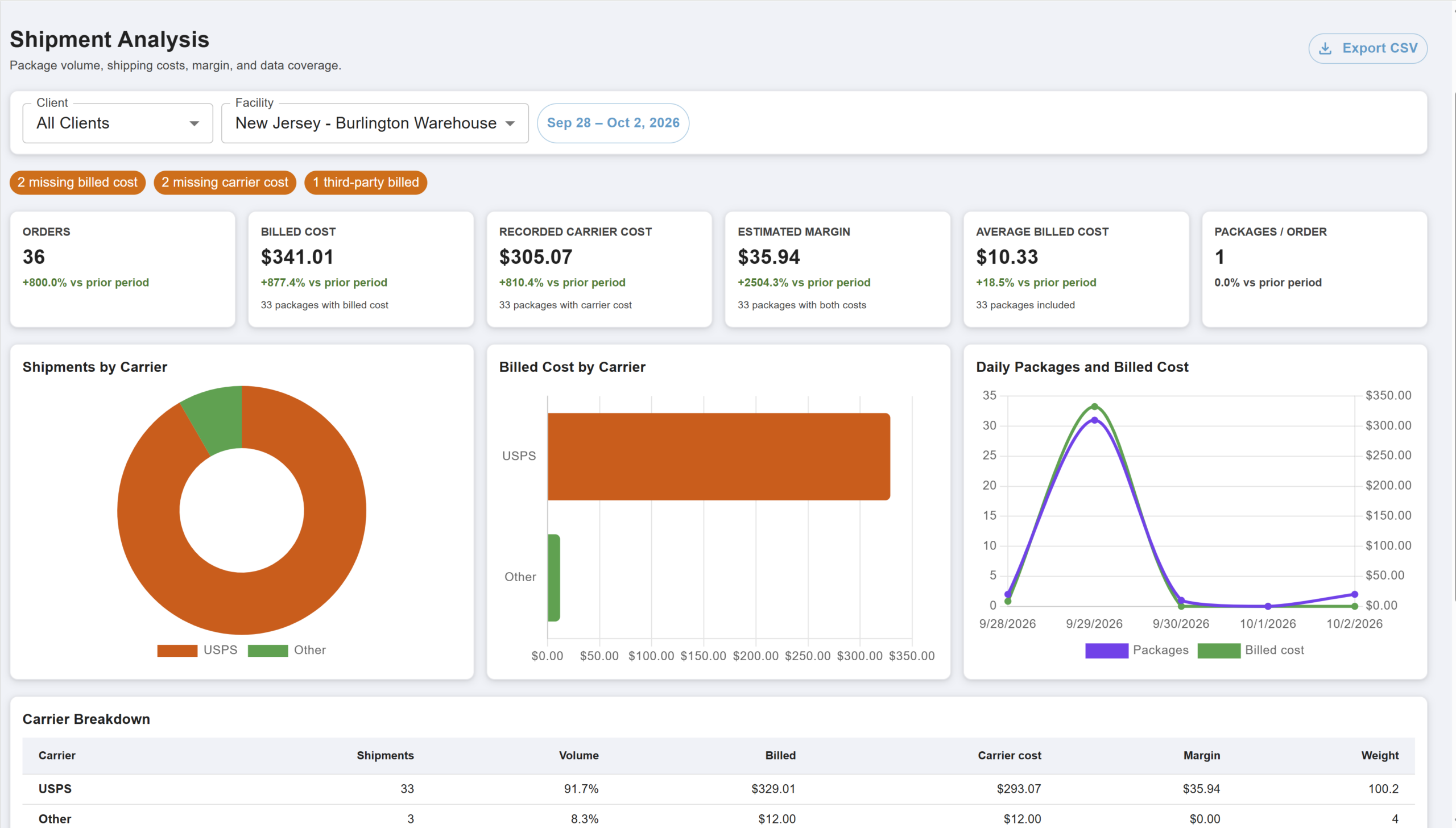
Packem’s Shipment Analysis report: billed cost vs. recorded carrier cost and estimated margin for each carrier. The flags at the top call out packages missing a billed cost or carrier cost, and shipments billed to a third party.
The flags matter more than the charts. “2 missing billed cost” means two packages went out the door with nothing charged to the client. In a paper or spreadsheet process, those are invisible until someone audits the month.
Real-time inventory visibility
Clients need to know what they have, where it is, and when they’re running low:
- Live counts that update as you receive, pick and ship.
- Location tracking down to the bin, shelf or pallet.
- Lot and expiration tracking with FIFO/FEFO rotation for food, supplements and regulated goods.
- Low-stock alerts to your team and your clients.
Without it, your team spends its day answering “where’s my inventory?” calls.
Client portal access
A client portal lets clients serve themselves: check stock, track orders from received to shipped, download invoices, place orders and pull their own reports. It turns your 3PL from a black box into a partner they can check on at 2 AM without calling you Monday morning.
Multi-channel order integration
Your clients sell on Shopify, Amazon, WooCommerce, TikTok Shop and through EDI with retailers. Orders from all of them should arrive automatically, with inventory synced back to every channel, rate shopping across carriers, labels printed from the WMS, and tracking pushed back to the sales channel.
Mobile scanning on the warehouse floor
Paper pick lists create errors. Mobile scanning catches them before they ship:
- Mobile receiving with pallet labels and quantity checks.
- Directed putaway that tells staff where each item goes.
- Batch and wave picking to cut walking time.
- Scan-to-verify packing.
- Cycle counts without stopping operations.
Staff should never need to walk back to a desktop. In Packem, new warehouse staff typically learn the scanner app in under an hour, and it runs on any Android scanner.
Advanced features for growing 3PLs
Pallet management with LPN tracking
If you do B2B, wholesale or pallet-in/pallet-out work, you need license plate numbers (LPNs) on every pallet, support for mixed-SKU pallets, cross-docking, and pallet-level storage billing. Many DTC-focused platforms treat pallets as an afterthought, so check this before you sign.
Lot and serial number tracking
Food, supplement, pharmaceutical and high-value clients need full traceability: lots captured at receiving, FIFO/FEFO picking, expiration alerts, serial capture and recall reports. Shipping expired product or failing an audit costs more than any WMS subscription. See our guide to lot tracking for food distribution.
Kitting and assembly
Kitting needs bills of materials, automatic component consumption, finished-kit inventory and kitting-specific charges. Without WMS support you’re tracking components by hand and probably undercharging.
EDI and retail compliance
Retail clients selling to Target, Walmart or Home Depot will need EDI: 850 purchase orders, 856 advance ship notices, 810 invoices, and for many 3PLs the 940/945 warehouse shipping order and advice. Most of these also require GS1-128 carton labels with SSCC numbers (see GS1 US for the label standard and X12 for the EDI transaction sets).
EDI opens the door to bigger clients but adds complexity. Ask every vendor which trading partners they’ve already connected, and whether they work through a provider like SPS Commerce or TrueCommerce. Packem partners with both. Our EDI integration guide explains the basics.
3PL software options compared
Here’s how the platforms small and mid-size 3PLs evaluate most often compare. Every one of them can run a 3PL; the question is which fits your size and mix of work. For a small-3PL view with published pricing, see our 3PL software buyer’s guide.
| Software | Best for | Watch out for |
|---|---|---|
| Packem | Small to mid-size 3PLs that want built-in billing, a client portal and EDI with hands-on US support | Smaller brand and integration marketplace than the largest vendors |
| Extensiv (formerly 3PL Central) | Established 3PLs that want a large integration ecosystem and fulfillment network | Per-client fees and a multi-product setup that can be heavy for small teams |
| ShipHero | High-volume DTC e-commerce fulfillment | Less focused on B2B, pallets and retail EDI |
| Logiwa | High-volume, automation-heavy DTC operations | Built for larger operations; more than most small 3PLs need |
| CartonCloud | 3PLs that also run trucks and want WMS and TMS together | Strongest in Australia and New Zealand; check US support hours |
| Camelot 3PL | Larger 3PLs with complex B2B and retail compliance needs | Built for bigger operations; confirm timeline and pricing for a small 3PL |
| Zenventory | Budget-conscious operations starting out | Lighter 3PL billing, portal and EDI depth |
For deeper head-to-heads, see Packem vs ShipHero, Packem vs Logiwa, Extensiv alternatives and our best WMS for small 3PLs buyer’s guide.
How to evaluate 3PL warehouse management software
Assess your size and complexity
Be honest about today and the next two years: monthly order volume, client count, DTC vs. B2B mix, and special needs like lots, hazmat or international shipping. A system built for 100,000+ orders a month is overkill for a 5,000-order operation.
Prioritize implementation speed
Enterprise WMS projects can take 6 to 12 months. A growing 3PL can’t absorb that. Look for 2 to 5 week timelines, included staff training, help migrating inventory and client data, and support during your first live week. Ask for references from customers who went live recently.
Evaluate total cost of ownership
Pricing models vary more than features:
- Per-user fees make it expensive to add warehouse staff.
- Per-client fees penalize you for growing.
- Volume tiers tie price to monthly orders.
- Implementation and integration fees can add thousands up front.
Model the cost at your current client count and at double it. A system that’s cheap at 10 clients can be expensive at 50. For context, small to mid-size 3PL WMS solutions typically range from $750 to $3,000 per month, while enterprise platforms start around $2,000 and can exceed $10,000. Our 3PL software pricing breakdown and WMS cost calculator go into detail.
Run demos on your own workflows
Generic demos hide the hard parts. Bring scenarios like these (or use our WMS demo checklist):
- “Set up billing for a client who pays weekly storage plus per-order pick fees.”
- “Receive a mixed pallet with three SKUs and lot numbers.”
- “Show me the client portal as my client sees it, and have them place an order.”
- “Show me which shipments this week went out without a billed cost.”
Count the clicks. If basic tasks take several screens, adoption will suffer.
Common mistakes when choosing a 3PL WMS
- Overbuying for future needs. AI optimization and thousands of settings sound good, but a 5,000-order operation needs software that works out of the box. Buy for now, with room to grow.
- Underestimating billing. Generic WMS billing modules are often weak. Ask whether rates differ by client, whether storage is tracked automatically at pallet, carton or bin level, how custom fees work, and whether invoices sync to accounting.
- Ignoring mobile. Confirm scanning covers receiving, putaway, picking, packing, cycle counts and lookups, and that it runs on devices you own.
- Skipping reference calls. Ask references how long implementation really took, how fast support responds, and whether they’d choose the system again.
Making the switch: implementation best practices
- Clean your data first. Remove duplicate and inactive SKUs, complete client records, reconcile physical inventory, and document every client’s rate card.
- Phase the rollout. Start new clients in the new system, move simple clients next, and migrate complex clients last.
- Train hands-on. Let staff practice receiving, picking and exceptions (damages, shortages, returns) before go-live.
If you’re moving off another system, our guide on how to switch 3PL WMS walks through the steps.
Frequently asked questions
What is 3PL software?
3PL software is any system a third-party logistics provider uses to run client operations. The core is a 3PL warehouse management system that tracks each client’s inventory separately, automates storage and handling fees, and gives clients a portal. Many also include shipping, EDI and accounting integrations.
What’s the difference between a WMS and 3PL software?
A standard WMS manages one company’s inventory. 3PL software adds what a multi-client warehouse needs: separate inventory per client, a rate card and invoice for each client, a client portal, and integrations with each client’s sales channels and EDI partners.
How much does 3PL warehouse management software cost?
Small to mid-size 3PL WMS platforms typically cost $750 to $3,000 per month, while enterprise platforms start around $2,000 and can pass $10,000 monthly. Watch for per-client and per-user fees, which raise the price as you grow. Packem uses flat pricing with unlimited clients and users.
How long does it take to implement a 3PL WMS?
For small and mid-size 3PLs, expect 2 to 5 weeks with clean data and a phased rollout. Enterprise systems often take 6 to 12 months. Packem has onboarded clients in as little as one week.
Do I need EDI in my 3PL WMS?
You need EDI if any client sells to big-box retailers like Target, Walmart or Home Depot. They require electronic purchase orders, advance ship notices (856) and GS1-128 carton labels. If you only ship DTC e-commerce orders, EDI can wait, but choose a WMS that can add it later.
Can 3PL software bill clients automatically?
Yes. A 3PL WMS records every billable activity (storage, receiving, picking, packing, accessorials) as it happens, prices it against each client’s rate card, and generates invoices on a schedule. Better systems sync invoices to QuickBooks or Xero and flag shipments that went out without a charge.
Choosing the right 3PL WMS
The right 3PL warehouse management software removes the billing headache, gives clients real-time visibility, and scales with you without an enterprise budget or an IT team. Focus on billing automation, multi-client inventory, mobile scanning and your clients’ integrations. Skip features you won’t use for years, and weigh implementation speed as heavily as feature lists.
This week: write down your three hardest billing scenarios and your messiest client workflow. This month: run two demos using those exact scenarios and call one reference for each vendor.
If you’d like to see those scenarios in Packem, book a 30-minute demo with our team. We’ll set up your rate card live and show you the shipment margin report on sample data.