Last updated: October 8, 2026 · By Sam Ranjbari, founder of Packem
3PL EDI is the exchange of standard electronic documents between a third-party warehouse, the brands it stores inventory for, and the retailers those brands sell to. Orders arrive as EDI (an 850 purchase order or a 940 warehouse shipping order), and the 3PL sends back shipment confirmations (945) and advance ship notices (856) that match exactly what’s on the truck, with GS1-128 labels on every carton and pallet.
For a small 3PL, EDI is usually not something you choose. A client lands Target, Petco or Amazon, and suddenly you need to receive retail orders electronically, build compliant pallets and send an ASN the retailer can trust. Get it right and you keep a client that’s growing into retail. Get it wrong and the client pays chargebacks, and you’ll hear about it.
This guide explains who sends what, the documents you’ll handle, what happens on the warehouse floor between an order and an ASN, how GS1-128 labels work, how to avoid chargebacks, and what to expect when you add a new retailer.
Key Takeaways
- The core 3PL EDI documents are the 940 (ship this order), 945 (here’s what shipped), 943/944 (inbound transfers and receipts), 846 (inventory levels) and 856 (the advance ship notice the retailer receives).
- The 856 ASN is the hardest part, because it has to describe every pallet and carton on the truck. That’s physical data only your warehouse can capture.
- Every carton and pallet gets a GS1-128 label with a unique 18-digit SSCC built from the brand’s own GS1 company prefix. The same SSCCs go in the ASN.
- Most chargebacks come from a late ASN, an ASN that doesn’t match the shipment, or labels that don’t scan or match.
- A 3PL doesn’t have to run its own EDI connections. Packem, for example, connects through SPS Commerce, which handles transport to the retailer while the WMS handles the warehouse side.
Who does what in 3PL EDI
Most confusion about 3PL EDI comes from not knowing who’s talking to whom. There are usually four parties:
| Party | Role | Typical documents |
|---|---|---|
| Retailer (Target, Petco, Amazon) | Places orders, receives shipments, enforces compliance rules | Sends 850 PO; receives 856 ASN and 810 invoice |
| Brand (your client, the supplier) | Owns the retailer relationship and the inventory | Receives 850; sends 810 invoice; often owns the EDI provider account |
| EDI provider (e.g., SPS Commerce) | Moves documents between trading partners, translates formats, keeps retailer maps current | Carries all of the above, plus 997 acknowledgments |
| 3PL warehouse (your WMS) | Receives, stores, picks, packs, labels and ships | Receives 850 or 940; sends 945 and 856; sends 944 and 846 |
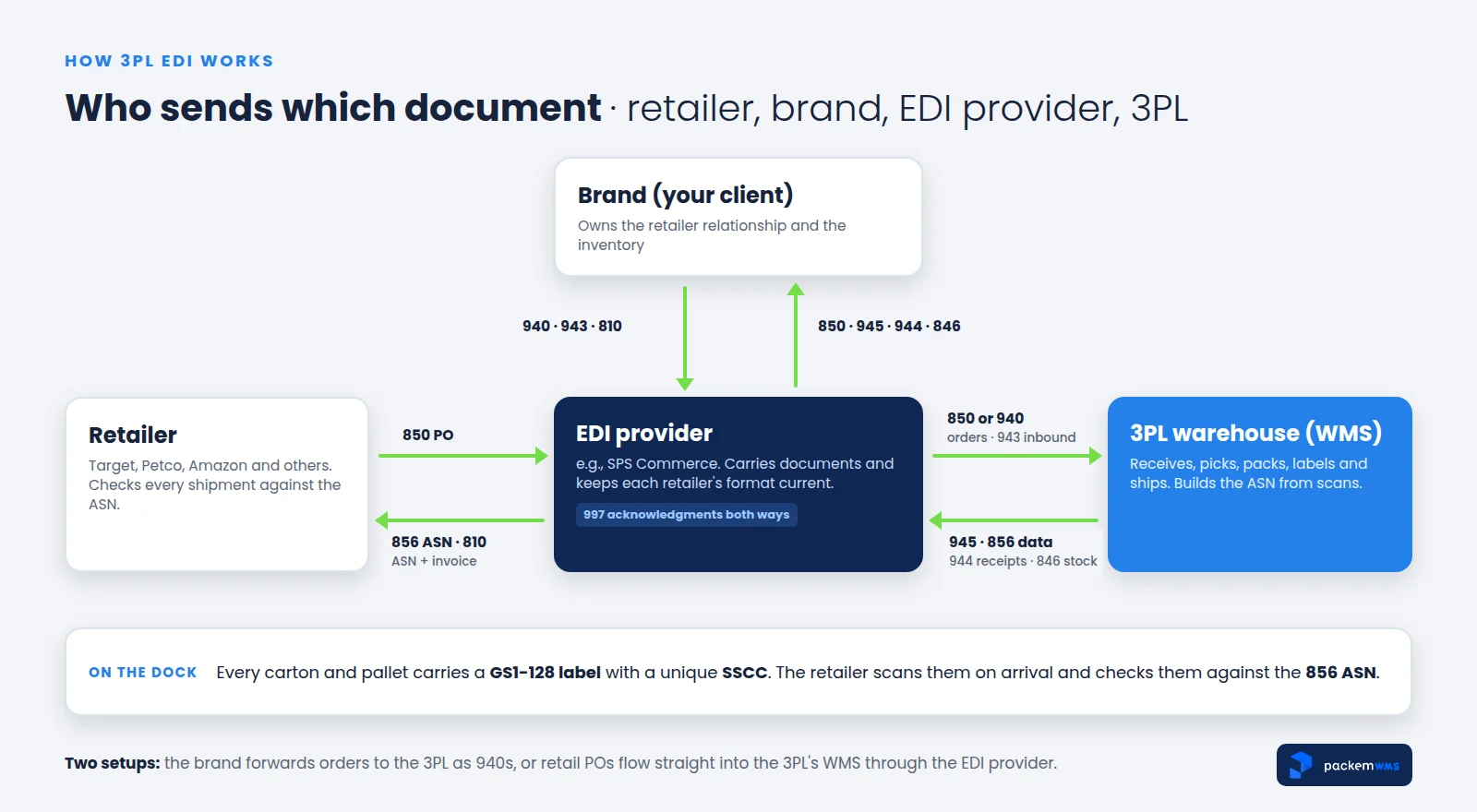
There are two common setups:
- The brand forwards orders to the 3PL. The retailer’s 850 goes to the brand, the brand’s system sends the 3PL a 940, and the 3PL answers with a 945. The ASN may be built by the brand from the 945, or sent straight from the 3PL’s data.
- Retail orders flow straight into the 3PL’s WMS. The retailer’s 850 arrives through the EDI provider and lands in the WMS as an order. The warehouse fulfills it and the ASN goes back out through the same provider. This is faster and leaves fewer places for data to get re-typed.
Either way, the retailer judges the shipment by one thing: does the ASN match what showed up?
The EDI documents a 3PL handles
You don’t need to memorize the X12 standard, but you do need to know what each document means for the warehouse.
| Document | Name | Direction | What it means for the 3PL |
|---|---|---|---|
| 850 | Purchase order | Retailer → brand (sometimes straight into the 3PL’s WMS) | A retail order to fulfill, with ship window and ship-to |
| 940 | Warehouse shipping order | Brand → 3PL | “Ship this order from my inventory” |
| 945 | Warehouse shipping advice | 3PL → brand | “Here’s exactly what we shipped, when, and how” |
| 856 | Advance ship notice (ASN) | Supplier side → retailer | Pallet-by-pallet, carton-by-carton description of the shipment |
| 943 | Warehouse stock transfer shipment advice | Brand → 3PL | “Inventory is on its way to you” |
| 944 | Warehouse stock transfer receipt advice | 3PL → brand | “Here’s what we actually received” |
| 846 | Inventory inquiry/advice | 3PL → brand (or brand → retailer) | Current stock levels |
| 810 | Invoice | Brand → retailer | The bill for the shipment |
| 997 | Functional acknowledgment | Both ways | “We received your document and it was readable” |
EDI 940 vs 945
The 940 and 945 are a pair. The 940 is the instruction: the brand tells the 3PL which items to ship, to whom, by when and how. The 945 is the confirmation: the 3PL tells the brand what actually shipped, including quantities, carrier, tracking or bill of lading, and ship date. If you shorted a line or substituted a carton count, the 945 is where that shows up. The brand relies on it to invoice the retailer correctly.
EDI 943 and 944
These cover inbound. The 943 tells you a transfer is coming (the brand’s advance notice to the warehouse). The 944 is your receipt confirmation: what arrived, in what quantities, and any damages or discrepancies. A fast, accurate 944 is how the brand knows its inventory is available to sell.
EDI 846
The 846 reports inventory levels. Some brands want it daily from their 3PL. Others pass it on to retailers that use it to decide what to order. An 846 is only as good as your inventory accuracy, which is where cycle counting earns its keep.
EDI 856 (the ASN)
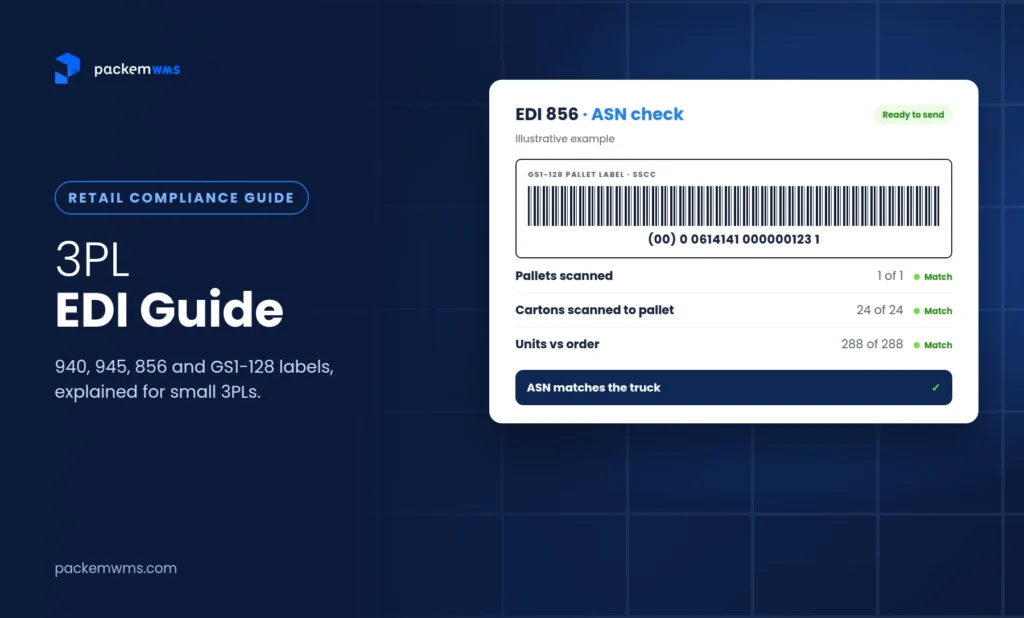
The 856 advance ship notice is sent before the shipment arrives and describes it in a strict hierarchy: the shipment, the order, each pallet (tare), each carton (pack) and the items inside. Each pallet and carton is identified by its SSCC, the number on its GS1-128 label. When the truck arrives, the retailer scans those labels and checks them against the ASN.
That’s why the 856 is usually the slowest document to get certified with a new retailer. In one Reddit thread, a team onboarding retailers through an EDI provider reported averaging 28 days to certify the 850 and 71 days for the 856. The 856 depends on physical data that only the warehouse can capture correctly.
From order to ASN on the warehouse floor
Here’s what a compliant retail shipment looks like inside a 3PL, using one of our clients shipping to Petco (we first described this flow in our Zenventory alternatives guide):
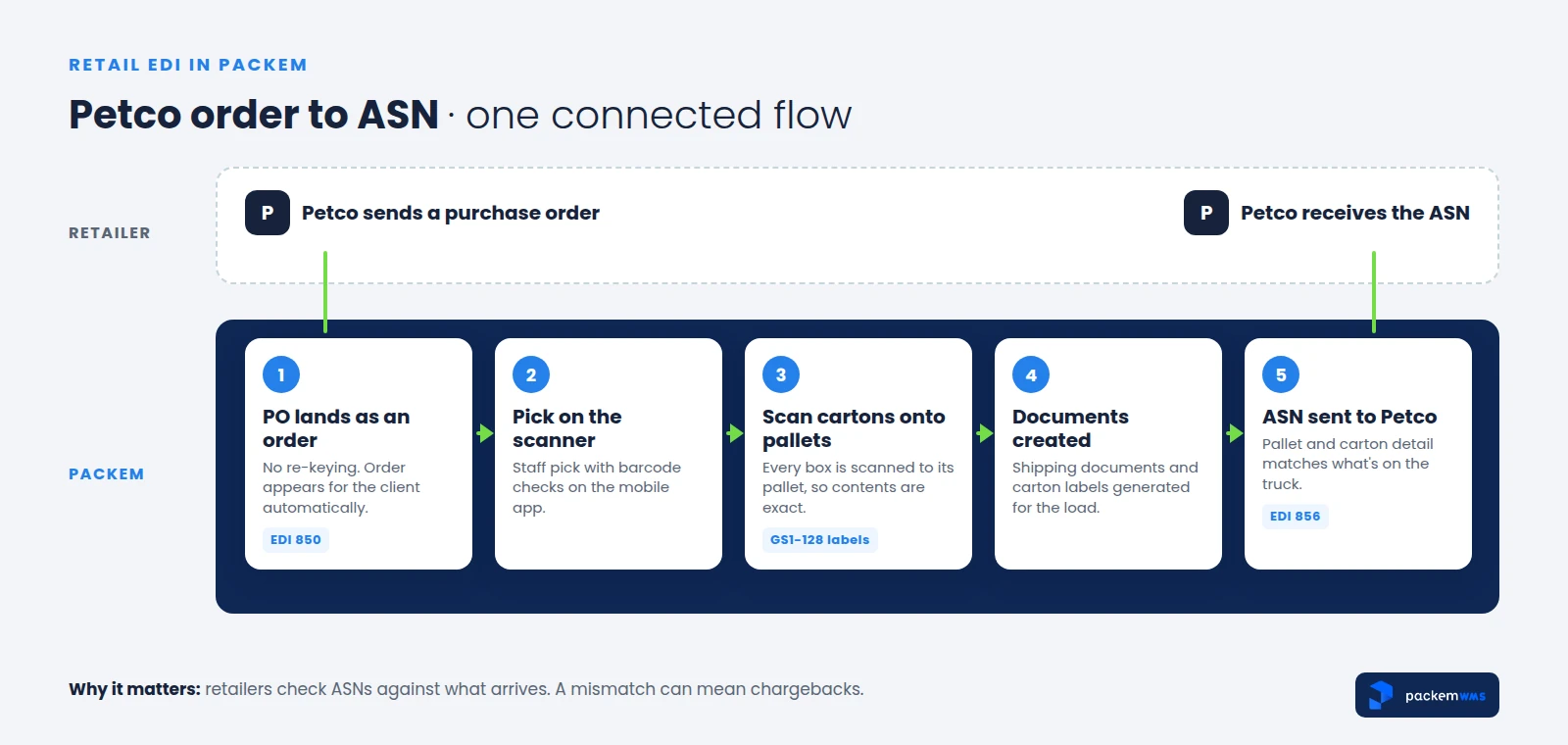
- The order arrives. The retailer’s PO (or the brand’s 940) lands in the WMS as an order, with no re-keying. Check the ship window and routing instructions now, not on ship day.
- Pick with scanning. Pickers scan every item with a barcode scanner app, so the right SKUs and quantities go into each carton.
- Pack and label each carton. Each carton gets a GS1-128 label with its own SSCC. The WMS records which items are in which carton.
- Build pallets by scanning cartons. Every carton is scanned onto its pallet, and the pallet gets its own SSCC label. Now the system knows the exact hierarchy: pallet > carton > item.
- Generate documents. Bill of lading, packing lists and any retailer-required paperwork come from the same data.
- Validate and send the ASN. The 856 is built from the scanned hierarchy, checked against the order and the retailer’s rules, and sent before the truck arrives (each retailer sets its own timing requirement).
- Confirm. Send the 945 to the brand if they’re using 940/945, and watch for the 997 acknowledgments that confirm your documents were received.
If any of steps 3 and 4 happen on paper, the ASN is a guess. Scanning cartons onto pallets is what makes it a record.
GS1-128 (UCC-128) labels and the SSCC
The GS1-128 label (still often called a UCC-128 label) is the shipping label retailers require on cartons and pallets. Its most important element is the SSCC (Serial Shipping Container Code), an 18-digit number that uniquely identifies one logistics unit, such as a carton or pallet.
According to GS1, an SSCC is made of:
- An extension digit (0–9), which lets the company create more numbers
- The GS1 company prefix of the company assigning the SSCC
- A serial reference, different for every carton or pallet
- A check digit, calculated from the first 17 digits
In the barcode, the SSCC is encoded with application identifier (00), and GS1 recommends it appear as the lowest barcode on the label. The SSCC itself carries no product information. It’s a key that links the physical label to the ASN, which lists exactly what’s in that carton or pallet. GS1 also says an SSCC shouldn’t be reused for at least a year after it was last used.
A few practical points for 3PLs:
- Use the brand’s GS1 company prefix. The SSCCs belong to the supplier shipping to the retailer, so they’re built from your client’s prefix, not yours.
- Never duplicate an SSCC. Two cartons with the same SSCC will break the retailer’s receiving and trigger a compliance issue. Let the system assign them.
- Follow each retailer’s label spec. Retailers publish requirements for label size, placement and extra data fields (such as PO number and ship-to). The SSCC structure is standard; the rest of the label varies.
In Packem, SSCC-18 numbers are generated from the client’s own GS1 company prefix plus a serial reference, with the check digit calculated automatically, and GS1-128 labels are printed as part of packing and palletizing. Label formats are configured during each retailer’s setup, so the 3PL doesn’t have to build them.
Retailer chargebacks and how to avoid them
Retailers enforce their rules with chargebacks: deductions from what they pay the supplier when a shipment doesn’t comply. The supplier takes the hit, and the supplier is your client. Amounts and rules vary by retailer and are set out in each retailer’s vendor or routing guide, so read the guide for every retailer a client sells to.
The most common triggers, and the warehouse control that prevents each:
| Chargeback trigger | What usually causes it | What prevents it |
|---|---|---|
| Late or missing ASN | ASN built by hand after the truck leaves | ASN generated and sent automatically when the shipment is confirmed |
| ASN doesn’t match the shipment | Cartons packed or palletized without scanning | Scan every item into cartons and every carton onto pallets |
| Missing or unreadable labels | Labels printed separately or by hand | GS1-128 labels printed from the system during packing |
| Duplicate or wrong SSCCs | Manually managed number ranges | System-assigned SSCCs from the client’s prefix |
| Wrong carton or pallet configuration | Not following the retailer’s packing rules | Retailer rules set up once, applied to every order |
| Missed ship window or routing | Order details checked too late | Review ship window and routing when the order lands |
Most of these come back to one question: was the ASN built from scanned reality, or from what someone expected to ship?
EDI built into the WMS vs a separate EDI provider
This is where many small 3PLs get stuck. There are three pieces in any working setup: the transport (how documents reach the retailer), the translation and retailer maps (keeping each retailer’s format current), and the warehouse logic (turning orders into picks, and picks into accurate 945s and ASNs).
| 3PL contracts its own EDI provider | WMS connected to an EDI network (e.g., Packem + SPS Commerce) | |
|---|---|---|
| Transport to retailers | Your provider account | The EDI network’s (the brand’s existing account can often be used) |
| Retailer maps and testing | You or your provider | Handled as part of retailer setup |
| Warehouse data (cartons, pallets, SSCCs) | Has to be exported to the EDI system | Comes straight from the WMS scans |
| Best when | You have an in-house EDI specialist or unusual partners | You want retail compliance without running EDI yourself |
EDI providers like SPS Commerce do an important job: they maintain connections and maps for thousands of retailers. What they can’t do is know which cartons went on which pallet in your warehouse. That data has to come from your WMS. The best setups let each side do what it’s good at.
That’s how Packem works. We connect through our partnership with SPS Commerce, using their API. SPS handles the retailer-facing transport. Packem handles the warehouse side: receiving POs, routing them into pick, pack and ship, validating the ASN and sending it back. We don’t run our own AS2 or VAN connections, and your clients don’t have to build or manage a separate EDI integration.
If the brand already uses SPS, its relationship stays in place. Packem connects the 3PL’s warehouse to the brand’s existing SPS account through the API. Retailer POs flow into Packem as orders, the warehouse fulfills them, and the shipment confirmation, ASN and acknowledgments flow back out through SPS. The brand keeps its retailer relationships and trading partner setup, and nobody has to switch providers.
What to expect when adding a new retailer
Each new retailer (a “trading partner”) has its own document specs, label requirements and testing process. Plan for it like a small project, the same way you’d onboard a new client.
Typical steps:
- Get the retailer’s requirements: EDI implementation guides for each document, the label spec and the vendor or routing guide.
- Confirm who does what: which documents go through the brand’s EDI provider, and whether orders will arrive as 850s or 940s.
- Map and configure: set up the documents, label format and any retailer-specific rules (carton limits, pallet height, required fields).
- Test: exchange test orders, ASNs and labels with the retailer until each document passes. The ASN usually takes longest.
- Go live and monitor: watch 997 acknowledgments and the first few shipments closely.
Timeline: in Packem, we do the setup for each retailer (mapping, configuration and testing with the retailer through SPS), so the 3PL doesn’t have to learn each retailer’s spec. A new retailer typically takes 3 to 6 weeks, mostly depending on the retailer’s testing schedule. Retailers already on the SPS network can be added without a new transport setup. Today our clients ship to retailers including Target, Petco and Amazon.
How to price EDI for your clients
This is one of the most common questions small 3PLs ask. A DTC-focused 3PL recently asked on Reddit how setup and maintenance fees for EDI are usually priced, because a new lead would need it. EDI provider fees vary widely, and other threads are full of complaints about hidden fees for things like trading partner setup and testing, so get the full fee schedule in writing.
When you build EDI into a client’s rate card, cover the work it actually creates:
- Retailer setup: a one-time fee per retailer for onboarding and testing
- Compliance labels: GS1-128 labels per carton and pallet
- Retail order handling: retail orders take more labor than DTC orders (carton rules, pallet building, documents)
- Ongoing EDI costs: any per-document or monthly fees you pay, passed through or bundled
Whatever model you choose, it should be visible on the client’s invoice. Our 3PL billing software guide covers how to set up charges like these.
How Packem handles 3PL EDI
To sum up the Packem side:
- Documents: 850, 856 (ASN), 997, 940, 945, 943/944, 846 and 810
- Connection: through our partnership with SPS Commerce, via their API. No separate EDI integration for your clients to build or manage
- Retailer setup: done by Packem (mapping, configuration, testing), typically 3 to 6 weeks
- Labels: SSCC-18 and GS1-128 labels from each client’s own GS1 company prefix, configured per retailer
- Warehouse flow: retail orders land as orders, staff pick and pack with scanners, cartons are scanned onto pallets, and the ASN is validated before it’s sent
If you’re comparing systems, see what matters in a 3PL WMS and how retail EDI fits into our 3PL warehouse management software.
Frequently asked questions
What is 3PL EDI?
3PL EDI is the electronic exchange of standard business documents between a third-party warehouse, the brands it serves and their retailers. The 3PL typically receives orders (850 or 940), confirms shipments (945), reports receipts and inventory (944, 846) and supports the advance ship notice (856) that retailers use to check shipments on arrival.
What’s the difference between EDI 940 and 945?
The EDI 940 is a warehouse shipping order: the brand tells the 3PL what to ship, where and when. The EDI 945 is the warehouse shipping advice: the 3PL confirms what actually shipped, with quantities, carrier details and ship date. The 940 is the instruction and the 945 is the proof.
What is an EDI 856 ASN, and who sends it?
The EDI 856 advance ship notice tells a retailer what’s coming before it arrives, organized by shipment, order, pallet, carton and item, with each pallet and carton identified by its SSCC. It’s sent on the supplier’s behalf, either by the brand or from the 3PL’s warehouse data through an EDI provider. Either way, it must match the physical shipment.
Does a 3PL need its own GS1 company prefix?
Usually not. SSCCs on GS1-128 labels are normally built from the brand’s (supplier’s) GS1 company prefix, since the brand is the one shipping to the retailer. The 3PL’s system generates unique SSCCs from that prefix and prints the labels.
How long does it take to add a new retailer?
Plan for several weeks. Each retailer has its own document specs, label rules and testing process, and the ASN usually takes longest to pass. With Packem, a new retailer typically takes 3 to 6 weeks, depending largely on the retailer’s testing schedule.
Do I need SPS Commerce if my WMS supports EDI?
It depends on how your WMS connects. Many WMS platforms rely on an EDI network or provider for transport to retailers. Packem connects through SPS Commerce, and if your client already uses SPS, Packem can connect to their existing account so they don’t have to switch providers.
Get retail-ready without becoming an EDI shop
Retail is where many DTC brands grow next, and the 3PL that can ship compliant retail orders keeps them. You don’t need an in-house EDI team for that. You need clean warehouse data (scanned cartons, scanned pallets, correct SSCCs) and a connection that carries it to the retailer.
This week: ask each client which retailers they sell to or are pitching, and collect those retailers’ routing guides. This month: walk one retail order through your warehouse and check whether your ASN could be built from scans alone.
If a client is heading into retail, book a 30-minute Packem demo and we’ll walk through the Petco order-to-ASN flow on a real setup.