Food Manufacturing Inventory Management Software: What Small Warehouses Actually Need
Food manufacturing inventory management software tracks lot numbers, expiration dates, and inventory rotation rules (FIFO/FEFO) across a warehouse or distribution facility. It gives food manufacturers and 3PLs real-time visibility into what is on hand, where each lot is stored, and which products are approaching expiry — so nothing ships out of compliance.
Last Updated: March 2026
Running inventory in a food warehouse is not the same as running inventory in a general warehouse. You are not just tracking quantities. You are tracking lot numbers, expiration dates, FIFO or FEFO rotation, and compliance with FDA traceability requirements. A general inventory system was not designed for this, and the gaps show up quickly during an audit or a recall event.
The FDA’s Food Safety Modernization Act (FSMA) traceability rule requires food manufacturers and distributors to track Key Data Elements (KDEs) for each Critical Tracking Event (CTE) throughout the food supply chain. That means documenting where each lot came from, where it was stored, and where it was shipped — and producing that record on demand during an inspection.
According to the Centers for Disease Control and Prevention (CDC), contaminated food products cause 128,000 hospitalizations and 3,000 deaths in the United States annually. The regulatory response to that statistic keeps tightening. And the cost of poor inventory management extends beyond compliance. The USDA estimates that food waste accounts for 30-40% of the total U.S. food supply — much of it occurring in warehousing due to inadequate inventory rotation. FIFO and FEFO compliance reduces spoilage directly.
This guide covers what food manufacturing inventory management software should do and what to look for when choosing a system.
What Is Food Manufacturing Inventory Management Software?
Food manufacturing inventory management software is a digital system that tracks inventory throughout a food warehouse or manufacturing facility, with specific capabilities for lot numbers, expiration dates, and regulatory compliance. Unlike general inventory software, food-specific systems enforce FIFO and FEFO rotation automatically, prevent expired products from being picked, and generate traceability reports for audits.
According to ReFED, 2022, U.S. food manufacturers generated 13.1 million tons of food waste — the largest single contributor to supply chain losses in the country.
According to the USDA, 2023, 13% of the world’s food is lost in the supply chain before it reaches retail — losses that structured inventory management systems are specifically designed to prevent.
At its core, this type of software handles:
– Real-time inventory quantities at the location and lot level
– Lot number assignment and tracking from receiving to shipping
– Expiration date capture and automated alerts
– FIFO and FEFO picking rules enforced at the scan level
– One-click traceability reports for compliance and recall events
Key Features of Food Inventory Management Software
When evaluating software, these features separate food-grade inventory systems from general tools:
Lot Tracking From Receiving to Shipping
Every item that enters your warehouse should be assigned a lot number during receiving. The system should track that lot number through putaway, storage, picking, and shipping — without requiring staff to manually log anything. When lot numbers are captured automatically at the scan, errors drop to near zero.
FIFO and FEFO Enforcement
Staff should never have to decide which lot to pick. The system enforces FIFO (oldest lot first) or FEFO (nearest expiry first) automatically, directing warehouse staff to the correct lot during picking. This matters most in high-volume operations where manual enforcement is impractical and errors are likely.
Expiration Date Alerts and Hard Stops
Good food inventory software alerts managers when items are approaching expiration and blocks the shipping of expired products entirely — even if a picker accidentally scans an expired item. A hard stop at the scan prevents compliance failures before they happen, not after.
Mobile Scanning Support
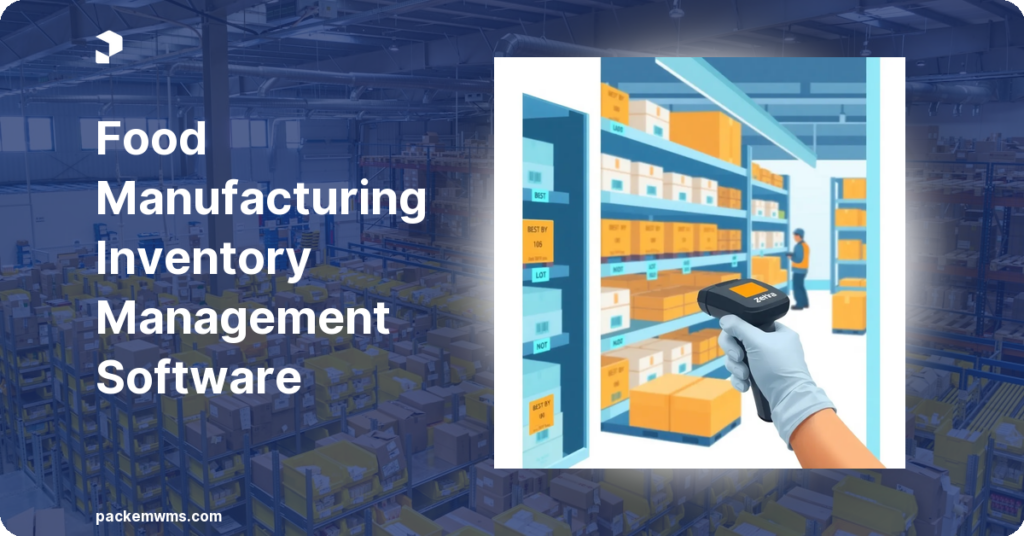
In a food warehouse, inventory management happens on the floor, not at a desk. Your software needs mobile app support for Android devices and Zebra handheld scanners so staff can receive, putaway, pick, and count inventory without returning to a workstation. Mobile barcode scanning is the foundation of accurate lot tracking in high-throughput food environments.
Traceability Reporting
A single-click traceability report should show every movement of a specific lot number — which supplier it came from, where it was stored, and which orders it was shipped to. This is the report you produce during an FDA audit or a customer recall. If your software cannot generate this in seconds, it will fail you when it matters most.
Real-Time Inventory Visibility
Real-time visibility means inventory counts update the moment a transaction occurs — receiving, picking, or shipping. No lag, no batch updates at end-of-day. Cloud-based WMS platforms provide this by design, and it is essential when managing multiple lots with different expiration dates simultaneously.
Why FIFO and FEFO Matter in Food Inventory Management
FIFO (First In, First Out) means the oldest lot in your warehouse ships first. FEFO (First Expired, First Out) means the lot with the nearest expiration date ships first, regardless of when it arrived. Both rules exist to prevent shipping products that are close to or past their expiry.
The distinction matters for food specifically:
– FIFO works well for shelf-stable goods with consistent, predictable shelf life
– FEFO is essential for fresh and frozen products where different batches of the same SKU can have different expiration dates depending on the supplier and production run
Most food warehouses need FEFO. General inventory systems default to FIFO or do not enforce rotation at all. This is why food-specific software matters: rotation rules must be automatic and enforced at the scan level, not left to individual warehouse staff to manage manually.
How Lot Tracking Works in Food Warehouse Software
In PackemWMS, lot tracking works like this:
Step 1 — Receiving: Staff scan incoming items with an Android scanner or Zebra device. The system prompts for lot number and expiration date. This data is captured once and linked to every subsequent transaction for that lot. No re-entry required downstream.
Step 2 — Putaway: The system records the lot number and its bin or pallet location. You can have the same SKU in multiple locations with different lot numbers — the system tracks all of them with full quantity accuracy per location.
Step 3 — Picking: When an order is generated, PackemWMS selects the correct lot based on your FIFO or FEFO rules. The pick list directs staff to the exact location and lot number. If they scan the wrong item, the system rejects the scan.
Step 4 — Shipping: Every shipped order has a full lot record embedded in the shipping documentation. You can see which lots were included in every shipment, and when.
Step 5 — Traceability: Any time you need a trace report — for an audit, a recall, or a client inquiry — you pull it by lot number in seconds. The report shows the complete chain of custody.
This is what food manufacturing WMS automation looks like at the operational level: no paper, no manual log, no gaps.
Choosing Food Inventory Management Software: 5 Questions to Ask
Before selecting software, work through these questions with any vendor:
1. Does it enforce FIFO/FEFO at the scan level, or just record which lot was picked?
There is a meaningful difference. Enforcement means staff cannot pick the wrong lot even by mistake — the scanner will not accept it. Recording is just documentation after the fact.
2. Can it handle multiple lots of the same SKU in different locations?
This is standard in food warehousing. If the system cannot track multiple lots per SKU across different bin locations, it was not built for food.
3. What does the traceability report look like, and how fast can you generate it?
Ask for a live demo of the actual report during the sales process. You need to produce this during an FDA inspection. If it takes 30 minutes to compile manually, it provides no real compliance value.
4. Does it support mobile scanning for Android or Zebra devices?
If your team picks by paper or enters lots manually on a desktop, accuracy will suffer in proportion to volume. Mobile scanning is not optional for lot-managed food inventory.
5. How long does implementation take?
ERP implementations take months. A purpose-built WMS like PackemWMS goes live in 2-5 weeks from contract signing. For most food warehouses, that timeline is the difference between solving the compliance problem this quarter or next year.
Ready to see how PackemWMS handles lot tracking and FIFO/FEFO in your operation? Schedule a demo with our team.
Frequently Asked Questions
What is FEFO in food inventory management?
FEFO stands for First Expired, First Out. It is an inventory rotation rule that directs warehouse staff to pick the product with the nearest expiration date first, regardless of when it arrived in the warehouse. FEFO is the preferred rotation method for food products where different production batches of the same item can have different expiration dates.
Does food manufacturing inventory software integrate with QuickBooks?
Yes. PackemWMS integrates directly with QuickBooks. Invoices generated from warehouse transactions sync automatically to QuickBooks, eliminating manual data entry. This is particularly useful for 3PLs handling food clients who bill for storage and handling fees.
What is the difference between lot tracking and serial number tracking?
Lot tracking assigns a single lot number to a batch of identical products from the same production run. Serial number tracking assigns a unique identifier to each individual unit. Food warehouses typically use lot tracking. High-value or regulated items such as medical devices use serial number tracking.
Can food inventory software prevent shipping expired products?
Yes, when configured correctly. PackemWMS captures expiration dates at receiving and can block the picking or shipping of any item that has passed its expiration date or is within a configurable alert window. The system rejects the scan if a picker tries to pick expired inventory — it does not just display a warning.
How long does implementation take for food inventory management software?
PackemWMS implementations take 2-5 weeks from contract signing to go-live, including system configuration, data migration, staff training, and testing. Enterprise ERP systems with food inventory modules typically take 3-12 months for an operation of comparable size.
Managing food inventory without purpose-built software is a compliance risk and an operational drag. Lot tracking, FIFO/FEFO enforcement, expiration date alerts, and traceability reporting are required for food manufacturers — not optional features. PackemWMS was built for exactly this environment, with mobile scanning workflows that eliminate manual errors and automated rotation rules that keep your inventory compliant without adding overhead to your team.