Batch and lot tracking software: the food warehouse guide
Last Updated: May 6, 2026
Picture this: the FDA calls at 7 a. m. and asks you to trace every unit of a specific product that left your dock in the past 90 days. You have 24 hours to respond. If your team is hunting through paper receiving logs and trying to piece together which orders shipped which lot, you are already in trouble.
Batch and lot tracking software is the system that prevents that scenario. It records every lot number from the moment product arrives through the moment it ships, and it gives you a complete traceability report in minutes, not days.
Food warehouses and 3PLs handling food, beverage, and ingredient products have moved beyond treating lot tracking as optional. With FDA’s FSMA Rule 204 now in effect and food recalls at a persistent high, lot tracking is operational infrastructure, not a compliance checkbox.
This guide covers what batch and lot tracking software does, why food warehouses need it, how FIFO and FEFO differ, and what to look for when evaluating systems, including how PackemWMS handles this for small and mid-size food warehouses.
What batch and lot tracking software does
Batch and lot tracking software records a unique identifier, called a lot number or batch number, against every unit of inventory from receipt through shipment. It connects that identifier to expiration dates, supplier details, and order history so operators can trace any product forward or backward through the supply chain in seconds.
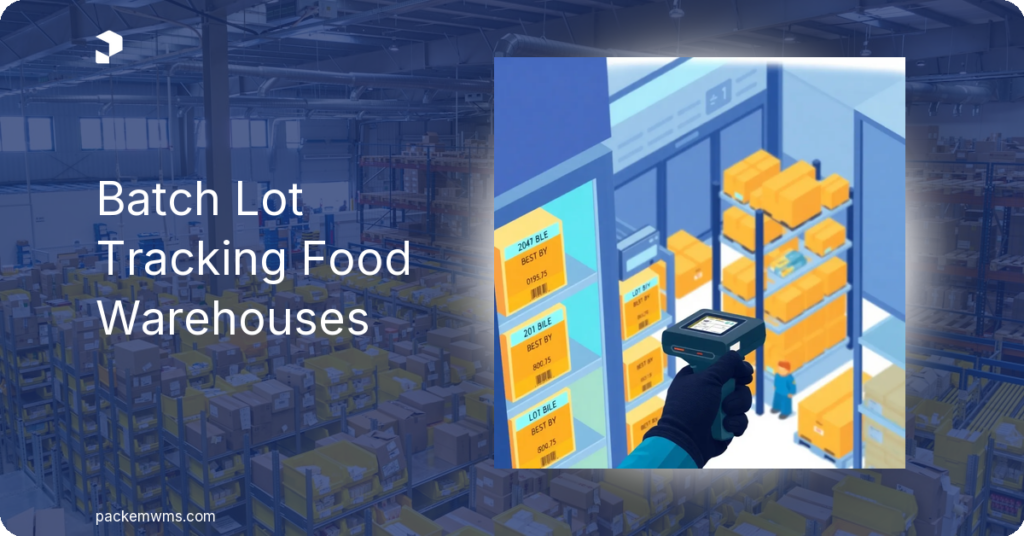
When a pallet of frozen vegetables arrives, your team scans the lot number printed on the case label. The system records it against a specific inbound purchase order, location, and timestamp. That lot number travels with the inventory through putaway, sits attached to its bin location, and gets pulled up automatically when a picker selects that product for an order. When the order ships, the lot number is captured on the outbound record.
The result is a complete chain: Lot 2024-B-004 came in from Supplier X on March 12, was stored in Zone C, picked for Order 78901 on March 19, and shipped to Customer Y. If Supplier X issues a recall for that lot, you pull the report, identify the customer, and call within the hour.
This is different from basic inventory management, which tells you how many units you have. Lot tracking tells you which units you have and where they came from. For food operators, that distinction is the difference between a manageable recall and a crisis. For a deeper look at what warehouse management systems do beyond inventory counts, see what is a warehouse management system.
Why food warehouses need lot tracking
Food recalls are not rare events. According to FDA Enforcement Reports, the United States sees hundreds of food product recalls every year, driven by undeclared allergens, Listeria contamination, labeling errors, and foreign material. Every day of delay in tracing a recall carries financial, legal, and reputational risk.
FSMA Rule 204
The FDA’s Food Safety Modernization Act (FSMA) Rule 204, which took effect for most businesses by January 2026, requires companies handling foods on the FDA’s Food Traceability List to maintain traceability records that include lot codes, dates, and supply chain movement data. The rule requires those records to be produced within 24 hours of an FDA request.
Foods on the Traceability List include fresh produce, shell eggs, nut butters, finfish, crustaceans, cheeses, and more. If your warehouse handles any of these categories for a 3PL client or as a food manufacturer, FSMA Rule 204 compliance is not optional.
Allergen and contamination risk
For food 3PLs handling multiple clients, commingling allergen-containing products creates significant liability. Lot tracking combined with location management lets operators verify that specific allergen lots are isolated from allergen-free products. Proper lot tracking software also flags when near-expired inventory is about to co-mingle with fresh stock.
Insurance and audit requirements
Food industry certifications like AIB International standards and USDA facility audits increasingly require demonstrated traceability capability. Buyers and retail partners routinely request proof of lot traceability before awarding contracts. Having software-generated records rather than paper logs makes audit preparation a routine pull, not a fire drill.
FIFO vs FEFO: which does your food warehouse need?
Both FIFO and FEFO are inventory rotation methods. Both are supported by modern food manufacturing WMS platforms. They serve different purposes, and food operations need to understand which one applies to their inventory.
FIFO: First In, First Out
FIFO ships the oldest inventory first, based on receipt date. If Lot A arrived before Lot B, Lot A ships first. FIFO is standard for general consumer goods and non-perishable products where age alone drives rotation. It is a sound default for most warehouse operations.
FIFO works well for: dry goods, packaged non-perishables, general merchandise.
FEFO: First Expired, First Out
FEFO ships the inventory with the earliest expiration date first, regardless of when it was received. This matters because a product received later can have an earlier expiration date than product that arrived before it. If your system rotates by receipt date (FIFO) but the later shipment expires sooner, you ship the wrong product first and risk sending expired or near-expired goods to customers.
FEFO works well for: frozen foods, dairy, fresh produce, beverages, pharmaceuticals, any product with a printed expiration or best-by date.
| Method | Rotation Logic | Best For |
|---|---|---|
| FIFO | Oldest receipt date ships first | General goods, dry goods |
| FEFO | Earliest expiration date ships first | Food, beverages, pharma, perishables |
For food warehouses and food 3PLs, FEFO software is the right default. A WMS that only supports FIFO will route pickers to inventory that may expire before stock received later. That creates spoilage, customer complaints, and potential liability.
How lot tracking works inside a WMS
The workflow in a properly configured lot tracking WMS follows five steps.
Receiving: Your team scans product at the dock. The WMS captures the lot number and expiration date against the purchase order. No product enters the system without a lot number attached.
Putaway: The lot number travels with the inventory to its bin location. If you have multiple lots of the same SKU in different locations, the system tracks each separately.
Picking: When an order releases, the WMS directs staff to the correct lot based on your rotation rule (FIFO or FEFO). The picker scans the lot number to confirm. If they attempt to pick the wrong lot, the system flags it before the product leaves the location.
Shipping: The lot number is captured on the outbound record. Your system now holds a complete chain from supplier lot to customer order.
Traceability reporting: Pull a report showing every order that received units from a specific lot, or every lot that went into a specific order. This is the report the FDA wants to see within 24 hours under FSMA Rule 204.
For warehouse teams, a barcode inventory system with mobile scanning is essential. Lot capture at receiving and pick confirmation must happen on a scanner on the warehouse floor, not back at a desktop computer.
What to look for when buying lot tracking software
Not all WMS platforms handle lot tracking the same way. Here is a checklist of capabilities to verify before you commit to a system.
Core lot tracking capabilities:
– Lot number capture at receiving (barcode scan or manual entry)
– Expiration date capture and storage per lot
– FEFO rotation enforcement at pick, not just FIFO
– Scan-based lot confirmation at pick to prevent wrong-lot errors
– Forward and backward traceability reports (lot to order, order to lot)
Compliance and recall features:
– One-click recall report showing all orders that received a specific lot
– Audit trail with timestamps on all lot transactions
– Expiration date alerts for near-expired inventory
– Ability to place lots on hold or quarantine
Operational usability:
– Mobile scanning app for lot capture on the warehouse floor
– Works with standard Android devices or Zebra scanners
– Cloud-based so records are accessible anywhere for an audit
For a broader view of what to evaluate when choosing any WMS, the key features of warehouse management systems guide covers the full checklist beyond lot tracking.
How PackemWMS handles batch and lot tracking
PackemWMS built lot tracking as a core feature, not a bolt-on. Here is what it looks like in practice for a food warehouse or food 3PL:
At receiving: Your team scans the inbound shipment and captures the lot number and expiration date. The system records it against the purchase order. No manual entry, no spreadsheet.
At putaway: The lot number follows the inventory to its bin location. PackemWMS tracks multiple lots of the same SKU stored in different locations simultaneously.
At picking: PackemWMS enforces FIFO or FEFO rotation rules automatically. The system directs pickers to the correct lot and requires a scan confirmation to prevent wrong-lot errors. If a picker tries to pick from the wrong lot, the system flags it before it leaves the warehouse.
Expiration alerts: Near-expired inventory surfaces in reports and alerts so you can prioritize it before it becomes a write-off or a compliance issue.
Traceability reports: Run a complete lot history report in seconds showing every order that received units from a specific lot, with timestamps and customer details. That is the report you need for an FDA audit or a client quality inquiry.
Implementation and pricing: PackemWMS goes live in 2 to 5 weeks at $750 to $1,800 per month with unlimited users and SKUs. No per-lot fees, no per-client fees.
Ready to see the lot tracking workflow in action? Request a demo and we will walk through a food warehouse scenario with your specific products and rotation rules.
Compliance and recall readiness
FSMA Rule 204 requires Key Data Elements to be captured at Critical Tracking Events: when food is received, transformed, created, or shipped. A WMS that captures lot numbers at each event and links them to timestamps, trading partners, and quantities meets the rule’s operational requirements.
When the FDA sends a request, you have 24 hours to respond. Paper-based systems and spreadsheets fail that test. Software-generated records do not.
Beyond FDA requirements, AIB International certifications and retail buyer requirements increasingly include traceability as a scored element. Having the software in place means your operation qualifies for more contracts, not just fewer regulatory problems. GS1 traceability standards ensure your lot number structure scans correctly at retail receiving docks and trading partner systems.
Frequently asked questions
What is the difference between batch tracking and lot tracking?
The terms are used interchangeably. A lot refers to a group of products manufactured under the same conditions. A batch refers to a group processed together. In WMS software, both describe the same function: assigning a shared identifier to a group of units for traceability. Batch and lot tracking software handles both.
What is FEFO and when does a food warehouse need it?
FEFO stands for First Expired, First Out. It directs pickers to ship the product with the earliest expiration date first, regardless of when it was received. Food warehouses need FEFO when handling products with expiration or best-by dates, because FIFO based on receipt date alone can result in shipping an earlier-expiring product after fresher stock. Frozen foods, dairy, fresh produce, beverages, and ingredients with shelf life requirements all benefit from FEFO enforcement.
Does FSMA Rule 204 require lot tracking?
Yes, in practice. FSMA Rule 204 requires businesses handling foods on the FDA’s Food Traceability List to maintain traceability records including lot numbers, dates, and supply chain movement data. Those records must be producible within 24 hours of an FDA request. Lot tracking software that captures this data automatically is the most practical way to meet that requirement. Manual records can satisfy the rule in theory but fail at the 24-hour production test.
How long does it take to implement lot tracking in a WMS?
Implementation time varies by system. Enterprise WMS platforms can take 8 to 12 weeks or longer. PackemWMS goes live in 2 to 5 weeks, including configuration of lot tracking rules, expiration date fields, rotation logic (FIFO or FEFO), and staff training on mobile scanning workflows.
Can a small food warehouse afford lot tracking software?
Yes. Lot tracking is not an enterprise-only feature. PackemWMS includes lot and serial number tracking, FIFO/FEFO rotation, expiration date alerts, and full traceability reporting starting at $750 per month with unlimited users and SKUs. Cloud-based WMS platforms built for small and mid-size food warehouses offer these capabilities with no IT staff required.
Getting lot tracking in place before your next audit
Batch and lot tracking software is the foundation of food warehouse compliance. It ensures you ship the right lot, in the right rotation order, with a full record of where every unit went. It prepares your operation for FSMA Rule 204 audits, client traceability requests, and recall scenarios.
The right batch and lot tracking software does three things well: captures lot data accurately at receiving, enforces your rotation rules at pick, and generates traceability reports instantly when you need them.
For food 3PLs and food manufacturers, that is the minimum viable operation for a compliant warehouse.
PackemWMS delivers all of it, live in 2 to 5 weeks. Request a demo to see batch and lot tracking in action for your food warehouse.